eJanma is the online civil registration system developed for Karnataka to manage records related to births and deaths. The portal is designed to simplify the process of registering events, issuing certificates, and maintaining digital records across urban local bodies, gram panchayats, hospitals, and other registration units.
The platform is primarily used by registrars, medical officers, village accountants, health inspectors, and other authorized officials for registration-related activities. Citizens can also use the portal for services such as certificate verification, application status tracking, and certificate download through connected services.
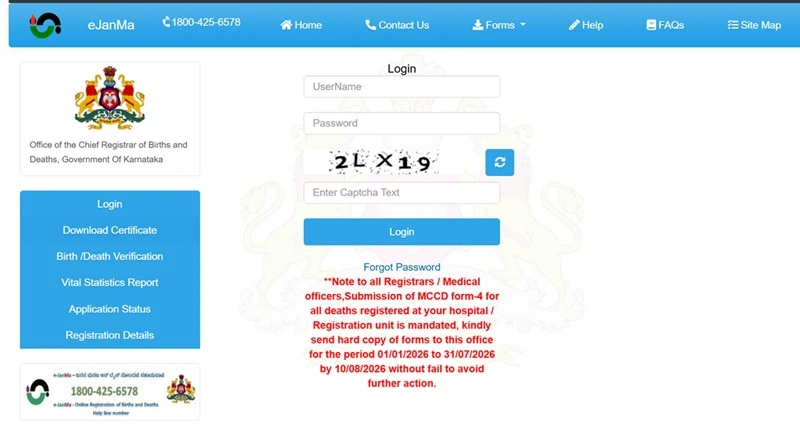
Official eJanma Login Portal
- Main Portal: https://ejanma.karnataka.gov.in/
The login page is mainly intended for authorized users who have been provided with credentials by the concerned department or registration authority.
How to Access eJanma Login
Follow these steps to access the eJanma login page:
- Open a web browser and visit https://ejanma.karnataka.gov.in/frmLogin.aspx .
- You will see the eJanma Login interface.
- Enter your Username in the required field.
- Enter your Password.
- Type the Captcha Code displayed on the screen.
- Click on the Login button to access the portal.
If the entered credentials are correct, the user will be redirected to the authorized dashboard where registration and certificate-related services can be managed.
Who Can Use eJanma Login?
The eJanma login facility is generally meant for authorized personnel involved in the registration and management of birth and death records. These may include:
- Registrars of Births and Deaths
- Medical officers of hospitals and health institutions
- Village accountants in rural areas
- Health inspectors and health officers
- Data entry operators at registration units
- Officials authorized by the Karnataka government for eJanma services
Citizens who need birth or death certificates usually access public services such as certificate download, verification, and application status tracking through the main portal and related service links.
Services Available on eJanma
The eJanma portal offers several important services related to civil registration. These include:
- Birth registration: Recording details of births that occur in Karnataka.
- Death registration: Recording details of deaths reported to authorized registration units.
- Certificate download: Accessing birth and death certificates through the linked Seva Sindhu service.
- Birth/death verification: Verifying the authenticity of registered birth and death records.
- Application status: Checking the status of applications submitted for certificate-related services.
- Registration details: Viewing details of registered birth and death events where applicable.
- Vital statistics reports: Accessing statistical reports related to birth and death registrations.
How to Download Birth or Death Certificate
For citizens, downloading a birth or death certificate is one of the most useful features connected with the eJanma system. The process generally involves the following steps:
- Visit the official eJanma portal at https://ejanma.karnataka.gov.in/ .
- Click on Download Certificate from the homepage.
- You may be redirected to the Seva Sindhu portal for authentication.
- Log in using the required credentials, OTP, or application reference details.
- Select the relevant service such as birth certificate or death certificate.
- Enter the required registration details or application reference number.
- Once the record is found and available, download the digitally signed certificate in PDF format.
How to Verify Birth or Death Records
The eJanma portal also provides a Birth/Death Verification service. To verify a record:
- Open the verification page from the eJanma portal.
- Enter the required details such as registration number, date of birth/death, district, or other requested information.
- Submit the details to search for the record.
- The system will display the verification status if the record is available in the database.
This service is useful for confirming the authenticity of certificates for official, educational, and personal purposes.
Common eJanma Login Problems and Solutions
1. Invalid Username or Password
Ensure that the username and password are entered correctly. Passwords are case-sensitive, so check for capital letters and typing errors.
2. Captcha Error
If the captcha code is not entered correctly, refresh the captcha image and try again.
3. Forgot Password
Authorized users who forget their password should use the password recovery option if available, or contact the concerned department or eJanma support authority.
4. Portal Not Loading
Government portals may occasionally experience heavy traffic or maintenance downtime. In such cases, try accessing the portal after some time or use a different browser.
5. Record Not Found
If a birth or death record is not found, verify that the entered details are correct. For older or undigitized records, users may need to contact the local registrar or registration unit.
Benefits of eJanma Portal
- Convenience: Users can access registration-related services online without unnecessary office visits.
- Transparency: The portal allows verification and tracking of records, improving transparency in service delivery.
- Faster service delivery: Digitally managed records help speed up certificate issuance and retrieval.
- Secure digital records: Birth and death records are maintained in an electronic database, reducing the risk of physical record loss.
- Statewide access: The system supports registration units across Karnataka, including urban and rural areas.
Important Tips for Users
- Always use the official eJanma website: https://ejanma.karnataka.gov.in/ .
- Keep your registration number, application reference number, and personal details ready while searching for records.
- Do not share login credentials with unauthorized persons.
- Use updated web browsers such as Chrome, Firefox, or Edge for better portal compatibility.
- If you face repeated login or certificate download issues, contact the concerned local registrar or the helpdesk mentioned on the portal.
Frequently Asked Questions
Q. What is the official eJanma login website?
The official eJanma login website is https://ejanma.karnataka.gov.in/frmLogin.aspx .
Q. Can citizens log in to eJanma?
The login page is mainly intended for authorized officials. Citizens can use the public services on the eJanma portal for certificate download, verification, and application status tracking.
Q. How can I download my birth certificate?
Visit the eJanma portal, select Download Certificate, and follow the instructions on the linked Seva Sindhu service using your application or registration details.
Q. Is eJanma available for death certificate services?
Yes, the eJanma system supports death registration, death certificate download, verification, and related services.
Q. What should I do if I cannot log in?
Check your username, password, and captcha entry. If the issue continues, authorized users should contact the concerned registration authority or eJanma support.