PSA Login is the official login system provided by UTI Infrastructure Technology and Services Limited (UTIITSL) for authorized PAN Service Agents (PSAs). Through the PSA portal, agents can offer PAN card-related services such as new PAN applications, PAN corrections, PAN reprints, status tracking, and e-PAN services to customers.
The portal is primarily designed for PAN service centers, retailers, agents, and businesses that assist citizens with PAN card services. Once registered, agents receive login credentials that allow them to access various PAN-related facilities online.
Through the PSA portal, agents can:
- Apply for new PAN cards
- Submit PAN correction requests
- Reprint PAN cards
- Download e-PANs
- Track PAN application status
- Perform PAN-related verification services
- Manage customer applications online
Official PSA Portal
Important portal links include:
- PSA Login Portal: https://psaonline.utiitsl.com/psapanservices/forms/login.html/loginHome
- UTIITSL Official Website: https://www.utiitsl.com/
Users should always access PAN services through the official UTIITSL platform.
Who Can Use PSA Login?
The PSA portal is mainly intended for:
- PAN Service Agents
- Retailers
- E-Governance Service Providers
- PAN Facilitation Centers
- Authorized Business Partners
- Financial Service Providers
Individual PAN applicants generally do not need PSA login credentials and can apply directly through PAN service portals.
PSA Login Process
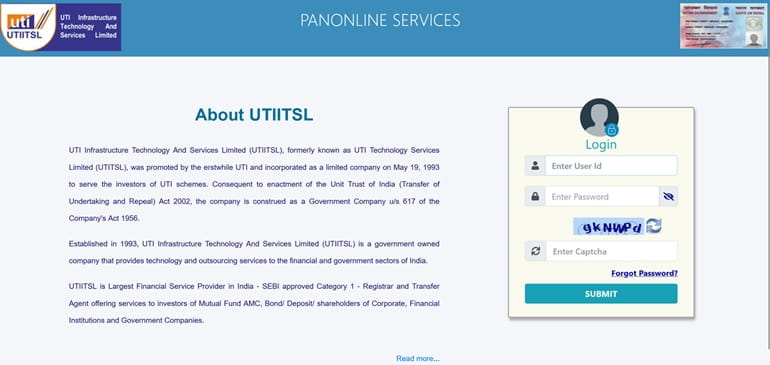
Registered agents can access their accounts using their assigned credentials.
Steps to Login to PSA Portal
- Visit the official PSA Login page.
- Enter your User ID.
- Enter your Password.
- Fill in the Security Code or Captcha.
- Click on the Login button.
- Access your PSA dashboard after successful verification.
After login, agents can manage PAN applications and related services.
How to Register for PSA Login?
New agents must complete registration before accessing the portal.
PSA Registration Process
- Visit the UTIITSL website.
- Apply for PAN Service Agency registration.
- Fill out the registration application.
- Submit required business and identity documents.
- Provide contact details.
- Complete verification.
- Receive login credentials after approval.
Once approved, agents can start offering PAN-related services through the PSA platform.
Documents Required for PSA Registration
The exact requirements may vary, but commonly required documents include:
- Aadhaar Card
- PAN Card
- Passport-size Photograph
- Address Proof
- Mobile Number
- Email Address
- Business Details
- Bank Account Information
Applicants should provide accurate information to avoid delays in approval.
Services Available Through PSA Portal
The PSA portal offers multiple PAN-related services.
- New PAN Card Application
Agents can submit applications for individuals and entities seeking a new PAN card.
- PAN Correction Services
The portal allows correction of:
- Name
- Date of Birth
- Address
- Photograph
- Signature
- Other PAN details
- PAN Reprint Requests
Applicants who have lost or damaged their PAN cards can request a reprint through the portal.
- PAN Application Tracking
Agents can track the status of PAN applications directly from the portal.
- e-PAN Services
Eligible users may access digital PAN services through the system.
- PAN Verification
The platform supports PAN verification services for authorized users.
How to Check PAN Application Status?
The PSA portal provides PAN application tracking functionality.
Steps to Track PAN Status
- Visit the UTIITSL PAN services page.
- Select the PAN status tracking option.
- Enter:
- Application Coupon Number or
- PAN Number
- Enter Date of Birth/Incorporation.
- Complete Captcha verification.
- Click Submit.
- View application status online.
This feature helps agents and applicants monitor the progress of applications.
Benefits of PSA Login
The PSA portal offers several benefits.
For Agents
- Centralized PAN service platform
- Faster application processing
- Online status tracking
- Multiple PAN services in one place
- Digital workflow management
For Customers
- Convenient PAN application services
- Faster processing
- Assistance from trained agents
- Easy correction and update services
These benefits make the PSA platform useful for PAN service providers and applicants alike.
Common PSA Login Issues and Solutions
Forgot Password
Use the password recovery option if available or contact support.
Invalid User ID
Verify the login credentials provided during registration.
Captcha Error
Refresh the captcha and try again.
Account Locked
Multiple failed login attempts may temporarily restrict access.
Portal Not Loading
Check your internet connection and try using an updated browser.
Most technical issues can be resolved through proper verification or support assistance.
Security Tips for PSA Users
To protect your PSA account:
- Use strong passwords
- Do not share login credentials
- Log out after use
- Regularly update passwords
- Use secure internet connections
- Monitor account activity
These measures help prevent unauthorized access.
Conclusion
PSA Login is an essential portal for authorized PAN Service Agents working with UTIITSL. The platform enables agents to apply for new PAN cards, submit correction requests, track application status, provide e-PAN services, and manage customer requests efficiently.
By digitizing PAN-related services, the PSA portal helps improve efficiency, reduce paperwork, and simplify the PAN application process for both service providers and citizens. Agents should ensure that they use the official portal and maintain secure login practices while offering services.
FAQs on PSA Login
Q. What is PSA Login?
A. PSA Login is the official login portal for PAN Service Agents associated with UTIITSL.
Q. What does PSA stand for?
A. PSA stands for PAN Service Agency.
Q. What is the official PSA Login website?
A. The official portal is https://psaonline.utiitsl.com/psapanservices/forms/login.html/loginHome.
Q. Who can use PSA Login?
A. Authorized PAN Service Agents, retailers, and service providers can use the portal.
Q. Can individuals directly use PSA Login?
A. No, the portal is generally intended for authorized agents and service providers.
Q. What services are available through PSA Portal?
A. Users can apply for new PAN cards, corrections, reprints, status tracking, and verification services.
Q. How can I track my PAN application?
A. You can use the PAN application tracking facility by entering the application coupon number or PAN details.
Q. How do I get PSA login credentials?
A. You must register as a PAN Service Agent and complete the approval process.
Q. What should I do if I forget my PSA password?
A. Use the password recovery option or contact the appropriate support channel.
Q. Is PSA Login related to UTIITSL?
A. Yes, the PSA portal is operated by UTI Infrastructure Technology and Services Limited (UTIITSL).