UMIS Login is the official login facility provided through the University Management Information System (UMIS) portal of the Government of Tamil Nadu. Developed by the Tamil Nadu e-Governance Agency (TNeGA), the portal serves as a centralized database for student information across higher educational institutions in Tamil Nadu. The official UMIS portal is available at https://umisdashboard.tnega.org/, while users can log in through https://umisdashboard.tnega.org/auth/login.
The primary objective of UMIS is to collect, validate, and manage student records from colleges and universities across the state. The platform integrates with Aadhaar, EMIS, scholarship systems, and other government services to streamline educational administration and student welfare programs.
Today, UMIS plays an important role in scholarship verification, student identity management, attendance monitoring, and educational analytics.
The portal helps:
- Store student records digitally
- Verify student information
- Support scholarship processing
- Track educational data
- Improve resource management
- Provide insights for policy-making
According to the official portal, UMIS also integrates with scholarship platforms to automate verification and improve the efficiency of benefit disbursement.
Who Can Use UMIS Login?
The UMIS platform is mainly designed for:
- College students
- University students
- Educational institutions
- Nodal officers
- Government departments
- Scholarship authorities
Each student is assigned a unique UMIS ID which can be used for various educational services and government schemes.
How to Login to UMIS Portal?
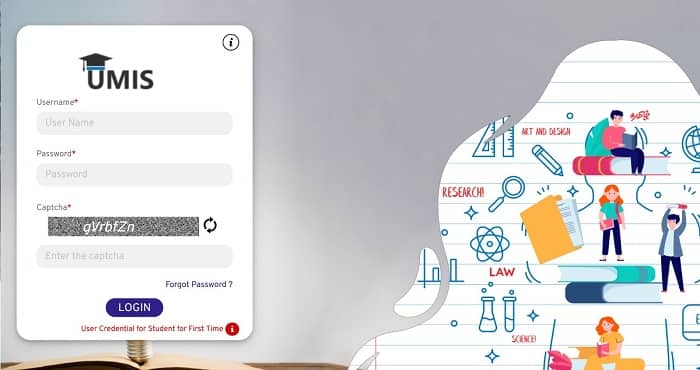
Students and authorized users can access their accounts through the UMIS login page.
Steps for UMIS Login
- Visit the official login page.
- Enter your Username.
- Enter your Password.
- Fill in the Captcha Code.
- Click the Login button.
- After successful verification, your dashboard will open.
Once logged in, students can access their academic records, scholarship-related information, and other services available through the portal.
First-Time Student Login Process
Students logging in for the first time may need to use their UMIS or EMIS number provided by their institution.
First-Time Login Steps
- Obtain your UMIS/EMIS number from your college or institution nodal officer.
- Visit the UMIS login page.
- Enter the UMIS/EMIS number as the username.
- Enter the default password provided according to portal guidelines.
- Complete captcha verification.
- Click Login.
- Change your password after successful login.
Students who do not know their UMIS number should contact their college administration.
UMIS Registration Process
Most student records are created through educational institutions rather than direct public registration.
How Registration Works
- Student admission details are collected by the college.
- Institution uploads student information into UMIS.
- Student data is verified.
- UMIS ID is generated.
- Students receive access credentials through their institution.
For special services, such as certain grievance modules, students may be able to initiate registration using Aadhaar-based verification.
How to Reset UMIS Password?
If you cannot access your account, password recovery options are available.
Steps to Recover Password
- Open the UMIS login page.
- Click on Forgot Password.
- Enter the required details.
- Complete verification.
- Create a new password.
- Log in using the updated password.
If password recovery does not work, contact your institution’s nodal officer.
Services Available After UMIS Login
The portal offers multiple student and institutional services.
1. Student Information Management
Students can access and verify personal and academic details stored in the system.
2. Scholarship Integration
UMIS integrates with scholarship platforms and helps verify student eligibility for government scholarship schemes.
3. Attendance Verification
Institutions can manage attendance-related modules for government schemes and academic monitoring.
4. Educational Analytics
The system helps government departments analyze enrollment trends, student performance, and dropout patterns.
5. Grievance Services
Students can raise grievances and track requests through designated modules available on the platform.
Benefits of UMIS Portal
The UMIS portal offers several advantages:
- Centralized student database
- Faster scholarship verification
- Reduced paperwork
- Better educational planning
- Improved data accuracy
- Easy student identification
- Digital record management
- Enhanced government decision-making capabilities
These benefits help institutions and government departments manage higher education more effectively.
Common UMIS Login Problems and Solutions
Forgot Password
Use the password recovery feature or contact your institution.
Invalid Username
Verify your UMIS/EMIS number with the college nodal officer.
Captcha Error
Refresh the captcha and try again.
Account Not Found
Ensure that your student details have been uploaded successfully by the institution.
Portal Not Opening
Check your internet connection and try a different browser.
UMIS Support and Helpdesk
Students requiring assistance can use the official support channels.
Contact Information
- Toll-Free Number: 14417 (Option 9) for institute and student-related queries.
- Technical Support (Call/WhatsApp): 9344237663
- Technical Support (Call/WhatsApp): 9344252673
The portal also allows users to raise tickets through the Grievance Redressal section.
Conclusion
UMIS Login provides students and educational institutions in Tamil Nadu with access to a centralized education management system. Through the portal, students can manage academic records, access scholarship-related services, and verify educational information online.
By integrating student databases, scholarship systems, and institutional records, UMIS has become an important digital platform supporting higher education administration in Tamil Nadu. Students should keep their login credentials secure and regularly update their information to ensure uninterrupted access to services.
FAQs on UMIS Login
Q: What is UMIS?
A: UMIS stands for University Management Information System, a centralized student database platform developed by TNeGA.
Q: What is the official UMIS login website?
A: The official login page is https://umisdashboard.tnega.org/auth/login.
Q: Who can use UMIS?
A: Students, colleges, universities, nodal officers, and authorized government departments can use the platform.
Q: How do I get my UMIS ID?
A: Your institution or college nodal officer provides your UMIS ID after registration.
Q: Can students register directly on UMIS?
A: Most registrations are handled by educational institutions, although some services may provide Aadhaar-based registration modules.
Q: What should I do if I forget my password?
A: Use the Forgot Password option or contact your institution for assistance.
Q: Is UMIS linked with scholarships?
A: Yes, UMIS integrates with scholarship-related systems for verification and processing.
Q: What services are available after login?
A: Students can access academic records, scholarship information, attendance-related services, and grievance modules.
Q: Is UMIS only for Tamil Nadu?
A: Yes, the platform is primarily designed for higher educational institutions in Tamil Nadu.
Q: How can I contact UMIS support?
A: You can call 14417 (Option 9) or contact technical support through 9344237663 and 9344252673.