Government e-Marketplace (GEM) is the official online procurement platform of the Government of India. It was launched to bring transparency, efficiency, and speed to public procurement. Through the GEM portal, government departments, ministries, public sector undertakings (PSUs), and other government organizations can purchase goods and services directly from registered sellers.
The official GEM portal is available at https://gem.gov.in/, while users can access the login page through the GEM Single Sign-On (SSO) system. The platform has transformed government procurement by creating a paperless, cashless, and contactless marketplace.
Today, thousands of government buyers and lakhs of sellers and service providers use the GEM portal for procurement activities across India. The portal provides a common digital marketplace where buyers and sellers can interact directly. Government departments can compare products, place orders, and make payments online, while businesses can register themselves and sell products or services to government buyers.
The GEM portal aims to:
- Increase transparency in procurement
- Reduce corruption and middlemen involvement
- Improve efficiency in purchasing
- Promote small businesses and startups
- Support the Digital India initiative
Since its launch, GEM has become one of the largest government procurement platforms in India.
Who Can Use GEM?
The GEM platform is designed for various types of users.
Government Buyers
- Central Government Departments
- State Government Departments
- Public Sector Undertakings (PSUs)
- Autonomous Bodies
- Government Educational Institutions
Sellers and Service Providers
- Manufacturers
- Traders
- Startups
- MSMEs
- Service Providers
- Individual Entrepreneurs
Both buyers and sellers must complete registration before accessing the portal’s services.
GEM Login Process
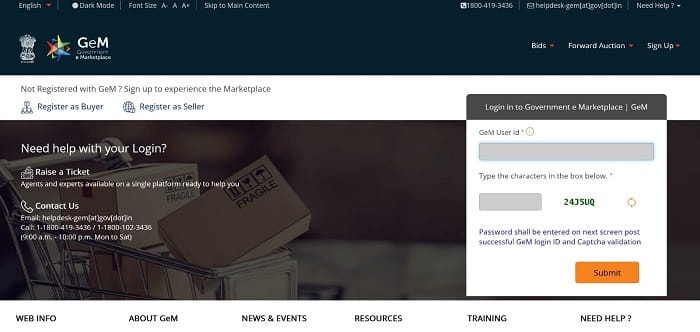
Registered users can access their accounts through the GEM login portal.
Steps to Login to GEM
- Visit the official login page: https://gem.gov.in/
- Click on the Sign In option.
- Enter your registered User ID.
- Enter your password.
- Complete the captcha verification.
- Click on the Login button.
- Access your dashboard after successful authentication.
Once logged in, users can manage orders, products, bids, contracts, and profile information.
How to Register on GEM Portal?
New users must complete the registration process before using the platform.
Seller Registration Steps
- Visit the official GEM portal.
- Click on “Sign Up.”
- Select Seller as the user type.
- Enter Aadhaar-linked mobile number.
- Verify through OTP.
- Provide business details.
- Enter PAN details.
- Enter GST information (if applicable).
- Add bank account details.
- Complete profile verification.
- Submit registration.
After verification, sellers can start listing products and services.
Buyer Registration Steps
- Visit the GEM portal.
- Choose Buyer Registration.
- Enter official government email ID.
- Verify identity.
- Provide department details.
- Complete approval process.
- Receive login credentials.
Government buyers can then start procurement activities.
Documents Required for GEM Registration
Depending on the user category, the following documents may be required:
For Sellers
- Aadhaar Card
- PAN Card
- GST Registration Certificate
- Business Registration Documents
- Bank Account Details
- Udyam Registration (if applicable)
For Government Buyers
- Official Department Details
- Government Email ID
- Authorization Documents
- Employee Identification Details
Keeping these documents ready helps ensure a smooth registration process.
Services Available on GEM Portal
The GEM platform offers several useful services.
Product Listing
Registered sellers can upload and manage product catalogs.
Service Listing
Service providers can offer professional services to government buyers.
Bid Participation
Sellers can participate in government tenders and bidding opportunities.
Order Management
Users can monitor and manage orders online.
Payment Tracking
Both buyers and sellers can track payment status.
Contract Management
The portal provides digital contract management facilities.
Vendor Assessment
Certain sellers can undergo vendor assessment to improve credibility.
These services help simplify government procurement processes.
Benefits of GEM Portal
The GEM platform offers several advantages.
For Government Buyers
- Faster procurement
- Competitive pricing
- Transparent purchasing process
- Easy product comparison
- Reduced paperwork
For Sellers
- Access to government buyers
- Nationwide market reach
- Online business opportunities
- Transparent bidding process
- Faster payment mechanisms
The platform benefits both buyers and suppliers through a streamlined procurement ecosystem.
Common GEM Login Issues and Solutions
Users may occasionally face login-related problems.
Forgot Password
- Use the “Forgot Password” option.
- Verify through OTP or registered email.
Account Locked
- Wait for the lock period to end.
- Contact GEM support if needed.
OTP Not Received
- Verify mobile number.
- Check network connectivity.
- Retry after some time.
Invalid User ID
- Ensure correct login credentials.
- Check for typing errors.
Browser Issues
- Clear browser cache.
- Use the latest browser version.
Most login issues can be resolved using these simple troubleshooting methods.
GEM Portal Support and Helpdesk
Users facing technical issues can seek assistance through the official GEM support channels.
Support Options
- Online Help Center
- User Manuals
- FAQs
- Ticket Support System
- Customer Care Assistance
The portal regularly updates its support resources to help users resolve issues quickly.
Why GEM is Important for India?
The Government e-Marketplace has played a significant role in modernizing public procurement in India.
The platform has:
- Increased transparency
- Reduced procurement costs
- Promoted MSMEs and startups
- Enhanced competition
- Improved efficiency in government purchasing
By digitizing procurement activities, GEM supports the government’s vision of creating a more transparent and accountable procurement system.
Conclusion
GEM Login provides access to one of India’s most important digital procurement platforms. Whether you are a government buyer, seller, startup, or service provider, the GEM portal offers numerous opportunities to participate in government procurement activities.
With features such as online registration, product listing, bidding, order management, and payment tracking, the platform has simplified procurement processes across the country. Users can easily register, log in, and utilize the services available on the portal to conduct business efficiently and transparently.
FAQs on GEM Login
Q: What is the official website of GEM?
A: The official website is https://gem.gov.in/.
Q: What does GEM stand for?
A: GEM stands for Government e-Marketplace.
Q: Who can register as a seller on GEM?
A: Manufacturers, traders, MSMEs, startups, and service providers can register as sellers.
Q: Is GEM registration free?
A: Basic registration on the portal is generally free, although certain services may have applicable charges.
Q: Can individuals sell products on GEM?
A: Yes, eligible individual entrepreneurs can register depending on applicable requirements.
Q: How do I log in to GEM?
A: Visit the GEM login portal, enter your User ID, password, and captcha, then click Login.
Q: What documents are required for seller registration?
A: Aadhaar, PAN, bank details, business information, and GST details (if applicable).
Q: Can startups register on GEM?
A: Yes, startups can register and participate in government procurement opportunities.
Q: What should I do if I forget my GEM password?
A: Use the Forgot Password option available on the login page.
Q: What are the benefits of using GEM?
A: The portal provides transparent procurement, wider market access, efficient purchasing, and opportunities for businesses to supply goods and services to government organizations.